
What Is SilverExch ID?

A SilverExch ID is your official verified login account that gives you secure access to all features of the Official SilverExch platform. It acts as your unique digital identity — helping you to log in safely, play responsibly, and manage your account with complete data protection.
Official SilverExch ID login interface showing secure and verified access system. Image by officialsilverexch.com.
Unlike random clone sites or fake domains, a verified SilverExch ID ensures you are connected to the authentic platform — https://officialsilverexch.com. Every verified ID is stored in an encrypted database, making it impossible for unauthorized users to access your information.
Whether you’re creating a new account or logging in to the app, the SilverExch ID keeps your profile, balance, and transaction data protected. This system is built with multi-layer authentication and SSL security, giving you the same reliability as a trusted banking login.
In short, your SilverExch ID = verified access + strong security + exclusive bonuses. It’s the only way to ensure you’re playing on the official SilverExch network, not a fake clone.
Why You Need an Official SilverExch ID
Using an official SilverExch ID is the single most important step to protect your account, money, and personal data on the platform. A verified SilverExch ID gives you several concrete benefits: encrypted storage of your credentials, multi-factor or OTP-based login options, access to exclusive promos and loyalty offers, and priority support through official channels. When you log in using the verified ID, transactions and balance updates are recorded against a validated user profile — that reduces disputes and speeds up withdrawals.
Beware of clone or phishing sites that copy the look-and-feel of SilverExch. These fake pages often ask for login details, OTPs, or payment confirmations and then misuse your credentials. Always confirm you’re on the verified domain: https://officialsilverexch.com before entering any details. If a site looks slightly different, has a strange URL, or requests to download unknown apps, close it immediately and report via the official contact channels.
Using an official ID also means better dispute resolution — verified accounts have KYC-backed records which the support team can act on quickly. Finally, remember: SilverExch services are for users who meet local legal age limits. If you’re under 18 in your jurisdiction, do not attempt to register or use gambling services; ask a responsible adult and follow local laws.
In short: verified ID = safer access, official benefits, faster support, and protection from scams. Always use the official link and official WhatsApp contact for help: +91 84400 57771.
How to Create Your SilverExch ID
Creating your SilverExch ID is a quick, verified process that ensures you’re registering on the official and secure platform. It takes less than 2 minutes and helps you unlock exclusive features, bonuses, and instant login access.
Here’s how you can safely create your SilverExch ID:
- Visit the Verified Website:
Go to https://officialsilverexch.com/register — avoid any other domain or third-party links. - Enter Your Basic Details:
Fill in your name, mobile number, and email ID accurately to ensure your account can be verified later. - Set a Strong Password:
Choose a combination of uppercase, lowercase, and numbers for your password. Avoid using the same password as on other sites. - Confirm OTP Verification:
Once you submit, you’ll receive an OTP on your registered mobile number — enter it correctly to verify your identity. - Agree to Terms & Conditions:
Check the box to confirm you are 18+ and accept the official SilverExch terms. - Get Confirmation via WhatsApp:
You’ll receive a confirmation message from the verified number
wa.link/s5u4w1 — this confirms your SilverExch ID is successfully created.
After completing these steps, you can log in anytime using your verified SilverExch ID and enjoy secure access across web and app platforms.
How SilverExch Verification Works
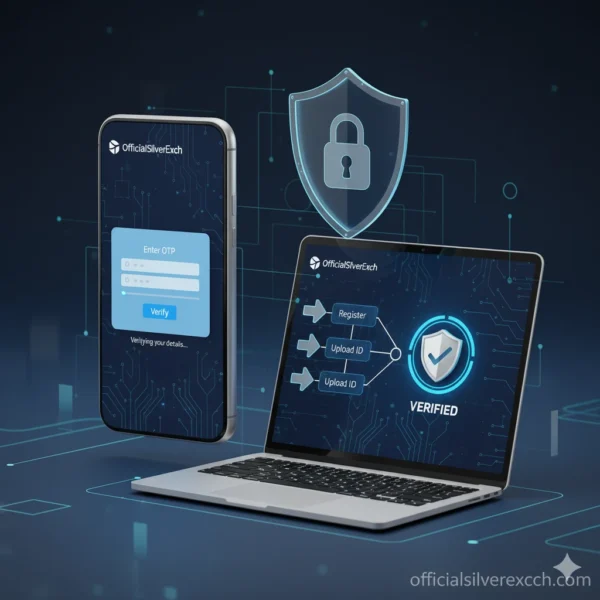
Official SilverExch verification flow illustration showing KYC and security steps for genuine users. Image by officialsilverexch.com.
Verification is the foundation of every official SilverExch ID. It ensures that every account belongs to a genuine user and helps prevent fraud, duplicate profiles, or unauthorized access. When you register, your data is stored in a secure encrypted database, and verification confirms that only you can control your account.
After sign-up, SilverExch automatically triggers a background validation through its KYC system. You’ll be asked to confirm your mobile number and email address using an OTP. In certain cases, you may need to upload a basic ID document (like a government ID card) to match your name and date of birth. This simple process helps the platform maintain legal compliance and user protection.
Once your details are verified, your account receives a “Verified Badge” within your profile. This badge allows seamless login across devices, priority access to promotions, and faster withdrawal approvals.
SilverExch uses SSL-based encryption, firewall protection, and real-time anomaly tracking to monitor suspicious activity. The verification system also blocks IPs linked to fraudulent sites, protecting you from scam operators or phishing domains pretending to be SilverExch.
In short, verification builds trust and transparency between the user and the platform. Every verified SilverExch ID is a guarantee that you’re on the authentic OfficialSilverExch network — safe, verified, and fully secure.
How to Login, Logout & Manage Your SilverExch ID
Managing your SilverExch ID is simple and built for both security and convenience. Once your ID is created and verified, you can access your account from the web or the official app using the same credentials. Here’s how to handle everyday account tasks safely:
Login: Go to https://officialsilverexch.com/login or open the OfficialSilverExch app. Enter your registered mobile number or email and your password, then confirm the OTP sent to your phone. If you have enabled two-factor or biometric login (fingerprint/FaceID on supported devices), use that for faster, secure access.
Logout: Always log out on shared or public devices. In the dashboard, tap the profile icon → Settings → Log out. Confirm the action and clear browser cookies if you used a public computer.
Reset Password: Click Forgot Password on the login page, enter your registered mobile/email, and confirm the OTP. Choose a strong new password and avoid reusing passwords from other sites. If you don’t receive an OTP within 5–10 minutes, use the official support channels before resubmitting (avoid multiple OTP requests).
Account Settings & Linking: From Account Settings you can update your name, email, and linked phone number. To link the SilverExch ID to the mobile app, go to App → Profile → Link Account and scan the QR or enter the one-time code — this creates a trusted device link for cross-device login.
Security Tip: Review active sessions in Settings and revoke any unknown sessions immediately. For account issues, use the official support WhatsApp: +91 84400 57771 or the site /contact page.
Troubleshooting SilverExch ID Problems
Even verified SilverExch users sometimes face minor issues such as login errors, OTP delays, or verification pending messages. Most of these can be fixed easily using official tools or the verified support number.
1. Login Error or Invalid Password
If you see “Invalid credentials,” check if Caps Lock is on and confirm you’re on the verified site: https://officialsilverexch.com/login. Clear cache/cookies, then retry. If the issue persists, reset your password using the Forgot Password option.
2. OTP Not Received
Sometimes OTPs are delayed due to network or DND settings. Wait 2–3 minutes, then click Resend OTP once. Avoid repeated clicks which may block the request. If you still don’t receive it, message the verified support WhatsApp +91 84400 57771.
3. Verification Delay
If your KYC is still pending, ensure your uploaded ID photo is clear and matches your account name. Re-submit only via the secure upload section—never through email or third-party forms.
4. App Not Syncing or Logging Out Automatically
This usually happens when you log in from multiple devices. Keep one primary phone active; use the Link Device feature in settings to re-authorize safely.
5. Forgotten Login Info
If you lose access to your email or phone, contact support from a verified alternate number with your ID reference. The team verifies ownership before re-enabling the account.
For all issues, remember: always reach out via official channels only. Fake “support” sites or Telegram groups are unsafe—avoid sharing OTPs or passwords anywhere else.
How the SilverExch App Works with Your ID
The SilverExch App is built to seamlessly connect with your verified SilverExch ID, giving you secure, instant access anywhere. Once your ID is created, you can log in on the app using the same credentials—no need to make a separate account. The app uses your verified ID for one-tap login, account synchronization, and faster updates.
After installing the app from the verified link on officialsilverexch.com, simply tap “Login with SilverExch ID.” The app automatically syncs your account settings, balance, and history from the main site. All updates are stored on encrypted servers so your data remains private and consistent across devices.
If you log in from multiple phones, SilverExch’s cross-device system tracks your verified session to prevent unauthorized use. You’ll also receive a “New Login Alert” whenever your ID is accessed from a new location or device—an important layer of account protection.
The integration also helps with faster withdrawals, live updates, and real-time notifications about bonuses or verification requests.
SilverExch uses cloud-based encryption and token authentication, which means your ID acts as a master key across both the app and website. If your session times out, simply reverify via OTP or biometric login.
For best performance, always download the app from the official source and never from third-party APK sites. Verified users enjoy smoother connectivity, instant notifications, and complete security—all powered by their trusted SilverExch ID.
Playing Smart and Staying Safe with SilverExch

The SilverExch ID system isn’t only about logging in and managing your account — it’s also about promoting safe, responsible, and enjoyable gameplay. SilverExch takes user well-being seriously and follows clear responsible-use guidelines that protect players from addiction, overspending, or misuse of the platform.
Responsible gaming illustration showing safe usage features and self-control options on SilverExch. Image by officialsilverexch.com.
Responsible gaming begins with awareness. When you register a verified SilverExch ID, you agree to terms that require users to be 18 years or older, use real identity information, and follow legal gaming limits. The platform provides built-in tools so users can set time reminders, deposit limits, and self-exclusion periods whenever needed.
1. Time and Budget Control
SilverExch allows every verified ID holder to control how much time and money they spend on the platform. Inside your account dashboard, you can open Responsible Gaming → Limits & Preferences, where you’ll find three core options:
- Session Timers: Set automatic logout reminders every 30 or 60 minutes to prevent overplay.
- Deposit Limits: Define daily, weekly, or monthly deposit caps; once reached, additional deposits pause automatically.
- Loss Caps: Establish a limit on how much you can lose per session so you can exit before crossing your comfort line.
These self-management tools help ensure that gaming remains entertainment, not a habit.
2. Recognizing Risk Behaviors
SilverExch also educates users about early warning signs — such as chasing losses, skipping responsibilities, or hiding spending. The official Responsible Gaming page (/responsible-gaming) includes checklists and self-tests that encourage honest reflection. If users feel they need a break, they can activate Self Exclusion Mode for 1 to 6 months. During that time, the account stays inactive and cannot be re-opened until the cooling-off period ends.
3. Parental & 18+ Protection
The platform deploys strict verification filters that block under-age users from accessing real-money sections. Parents are advised to protect their devices with passwords or app locks. SilverExch’s algorithm flags suspicious under-age activity and instantly suspends those accounts pending manual review.
4. Data Privacy & Emotional Balance
Responsible use also means protecting your emotional and financial privacy. SilverExch stores all user data in AES-256 encrypted databases and never shares it with advertisers or third parties. Notifications are limited to verified sources, preventing spam or manipulative content.
SilverExch encourages players to take regular breaks, balance screen time with outdoor activities, and seek help if gaming starts to feel stressful. Remember: your SilverExch ID is a tool for entertainment — not pressure.
5. Getting Help
If you ever feel overwhelmed, visit the Responsible Gaming page or reach the verified support team on WhatsApp at +91 84400 57771. The team can temporarily lock your account or connect you to certified counseling partners.
Responsible play ensures SilverExch stays a trusted, transparent, and secure space for every verified user. Stay smart, stay balanced, and enjoy the benefits your official SilverExch ID offers — safely.
Security Tips for Your SilverExch ID
Keeping your SilverExch ID safe is the single most important habit for every verified user. Follow these practical, high-impact tips to protect your account, money, and personal data while using OfficialSilverExch.
Security concept image showing shield, lock, fingerprint, and verified badge to illustrate account protection. Image by fairplaybet.live.
1. Use a Strong, Unique Password
Pick a password at least 12 characters long with upper- and lower-case letters, numbers, and a symbol. Don’t reuse passwords from other sites. Consider a reputable password manager to store complex credentials securely.
2. Enable Two-Factor Authentication (2FA)
Turn on OTP-based 2FA or biometric locks (fingerprint/FaceID) in Account Settings. 2FA prevents unauthorized login even if someone learns your password.
3. Beware of Phishing Links
Always confirm you’re on https://officialsilverexch.com before entering details. Don’t click links from unknown emails, messages, or social posts. Official support uses the WhatsApp number +91 84400 57771 — never share OTPs, passwords, or PINs with anyone.
4. Verify Login Sources & Active Sessions
Regularly check Account → Security → Active Sessions and revoke any unfamiliar device. If you get a “New Login Alert” you didn’t initiate, immediately change your password and notify support.
5. Keep Devices & Apps Updated
Run the official app from the verified site only; update OS and app versions to patch security vulnerabilities. Avoid third-party APKs or modified apps.
6. Secure Your Email & Phone
Your recovery email and phone are the gateway to password resets. Protect them with strong passwords and 2FA as well.
7. Report Suspicious Activity Immediately
If you see strange transactions or messages asking for login info, contact official support via /contact or WhatsApp +91 84400 57771. Do not respond to unofficial channels.
Age & Safety Reminder: SilverExch services are for users 18+ only. If you’re under 18, do not register — ask a responsible adult for help and follow local laws.
Stay vigilant — your SilverExch ID is your key. Protect it like you would your bank account.
FAQs — Top Questions About SilverExch ID
1. How long does verification take?
Verification usually completes within a few minutes after OTP confirmation. If you upload ID documents for KYC, it can take up to 24–48 hours during peak times. You’ll get status updates in your dashboard and via WhatsApp from +91 84400 57771.
2. Is SilverExch ID free?
Yes — creating and maintaining a SilverExch ID is free. Charges may apply only for optional services (like expedited KYC) which will be clearly stated before you pay.
3. Can one ID be used on multiple devices?
Yes. A verified SilverExch ID works across devices (web & app). The platform tracks active sessions; you’ll receive a “New Login Alert” for unrecognized devices and can revoke sessions from Account → Security.
4. How do I reset my password?
Click Forgot Password on the login page, enter your registered mobile/email, confirm the OTP, and set a new strong password. If you can’t access your phone/email, contact verified support via /contact or WhatsApp +91 84400 57771.
5. What if I lose my login info?
If you lose access to both your email and phone, contact support from a verified alternate number and provide identity details for manual verification. The team will assist after ownership checks.
6. Is SilverExch safe for under-18 users?
No. SilverExch services are strictly for users 18+. Under-age accounts are suspended immediately upon detection.
CTA: Ready? Create Your SilverExch ID Now or message verified support: https://wa.me/918440057771?text=Hi%20Support%20-%20I%20need%20help%20creating%20my%20SilverExch%20ID